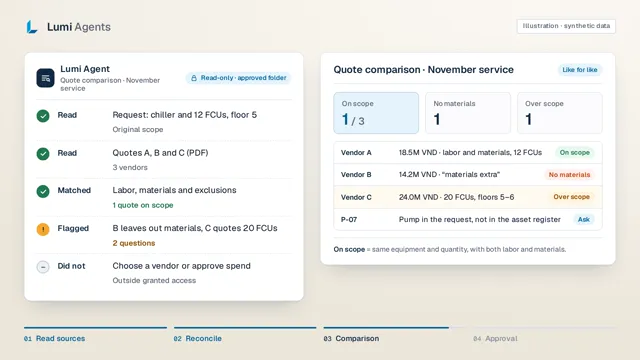
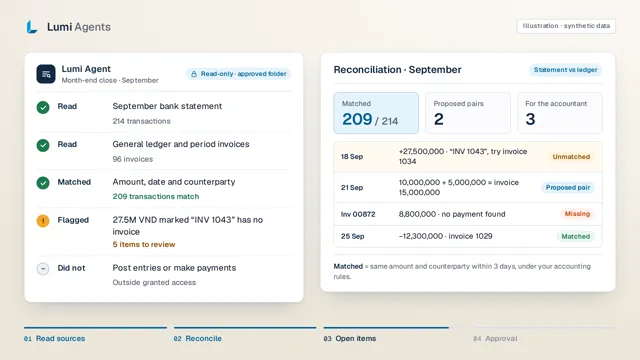
Hand AI agents the repetitive work: cross-checking sheets, preparing drafts, compiling reports. Agents work in the files and tools you grant, BI puts the numbers on one agreed definition, and every result comes back to you for review.
An authored example of a planned agent task, not a product execution result.
Watch in 26 seconds
A Monday morning with an agent and BI on the job.
The agent reads the ads report and the sales file, finds 10 unmatched orders, BI puts the numbers on one agreed definition, and the ads lead approves the next step.
IllustrativeIllustration with synthetic data: 100 orders in the ads report, 90 confirmed, 10 to reconcile. Not customer figures.Read the video as text
Monday, 8:30. The ads report says 100 orders. How many actually went through?
Lumi Agent, read-only on an approved folder: reads the week 41 ads report and Orders.xlsx, matches order IDs, finds 90 confirmed orders and flags 10 that are missing from sales. It does not change budget or edit source data.
BI on agreed metrics: ad spend 12 million VND, confirmed-order revenue 36 million VND, 90 of 100 orders confirmed, 133 thousand VND spend per confirmed order.
Agent proposal to the ads lead, with sources: reconcile the 10 unmatched orders before raising budget. The ads lead approves; the agent lists the 10 orders for the operations team. Budget unchanged.
AI agents do the repetitive work. BI gives you numbers to decide on. You approve the steps that matter.
Work you can hand off
Pick the job closest to yours.
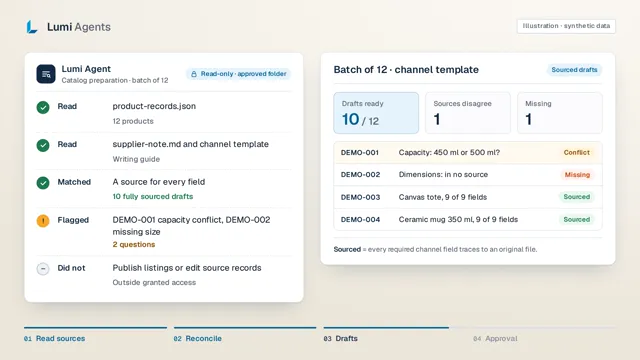
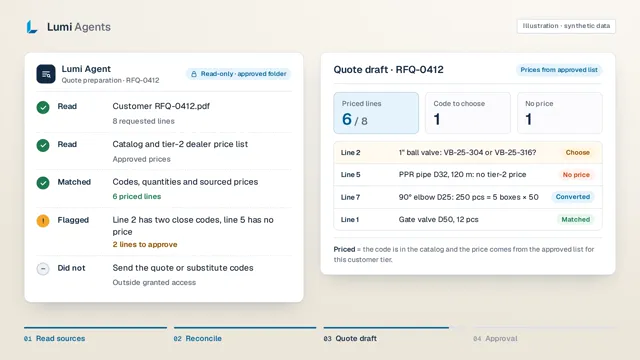
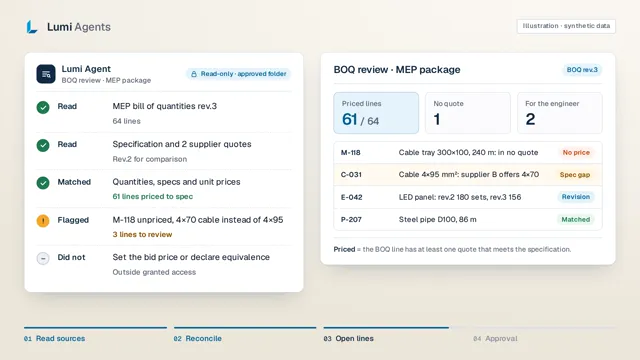
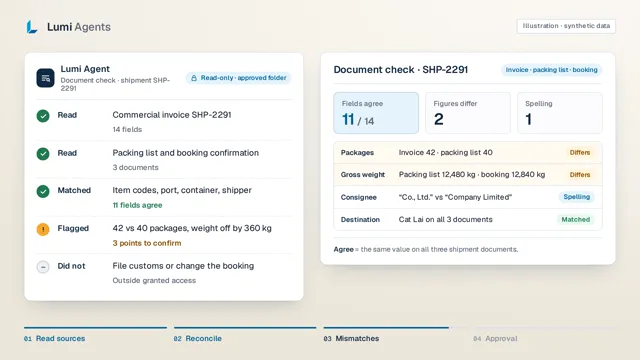
Each industry has a 26-second video and three synthetic scenarios: what the agent reads, where it stops, and what you approve.
Images are frames from illustrative videos with synthetic data. BI is deployed with customers; the agent for each industry is a proposed scope.
Try it in your browser
Paste order IDs and see how the agent reconciles them.
The demo applies the same rule the agent uses before drafting a proposal: which orders appear in the ads report but are missing, or cancelled, in the sales file. Edit the sample or paste your own order IDs.
IllustrativeReconciliation result
Matched8 / 12
Cancelled1
Not in sales file3
Only in sales file1
Orders missing from the sales file
DH-2410DH-2411DH-2412
Cancelled orders
DH-2405
The agent would propose
Reconcile 4 orders (3 missing from the sales file, 1 cancelled) before counting ad revenue.
The agent never changes budgets or edits data; your ads lead decides.
Nothing you paste is sent anywhere: the matching runs in your browser. This is a demo of the rule, not the product; the real agent works on the files you grant once scope is agreed.
01
How Lumi works for you
Say what you need, not how to do it.
Describe the result you want. The agent reads the sources, cross-checks, prepares the draft and hands it back for you to approve.
AI agents take the repeat work
Matching sheets, preparing drafts, collecting missing and conflicting rows. Monday starts with a packet waiting for review, not a pile of spreadsheets.
BI gives everyone the same number
Sales, ads and operations data on one set of metric definitions, so the budget meeting starts from the figure instead of arguing about which figure is right.
The agent asks first; you approve
You choose the folders and tools it may use. Every step is logged and significant actions wait for your approval. Agents never publish, send or edit source systems on their own.
There are no customer results cleared for publication yet; figures on this page are synthetic.
02
Example: a catalog agent
Hand off a batch. See each step. Get back a packet.
The first workflow Lumi is preparing. From supplier sheets and channel templates, the agent cross-checks, leaves unsourced fields blank and collects questions for the owner.
01
Choose files
Your team
Point to the folder, sheets and channel templates the agent may read.
02
Compare
AI agent
Keep SKUs intact, match specs and cite a source for every field.
03
Review
Your reviewer
Resolve the conflicts and gaps the agent collected. The final call stays yours.
04
Hand over
Review packet
Template-ready drafts, an exception list and check notes. Your team publishes.
Illustrative
Sample batch: two products
01Choose files
product-records.jsonProduct records
supplier-note.mdSupplier note
brand-guide.mdWriting guide
Channel templateSupplied by your team
02Compare
DEMO-001Capacity: 450 ml vs 500 mlSources disagree
DEMO-002Dimensions: not in any sourceMissing
03Review
Confirm DEMO-001 capacityProduct owner
Supply DEMO-002 dimensionsProduct owner
04Hand over
Listing drafts
2
Open questions
2
Check notes
1
Both stay drafts until review is complete. Your team publishes.
One authored batch, four steps. It matches the downloadable sample packet.
Your team reviews and publishes.
03
Agent worklog
See the work as it happens, including what it chose not to do.
The planned workflow records which sources the agent read, what it found, what it deliberately left alone and who it handed over to, so a reviewer can check every step.
Illustrative
Worklog · sample batch
Access: read-only, approved folder
Read
Two source files in the approved folder
product-records.json · supplier-note.md
Matched
Two SKUs, product codes kept unchanged
DEMO-001 · DEMO-002
Flagged
Capacity differs between the sources, so it stays out of the draft
450 ml / 500 ml
Left blank
DEMO-002 dimensions are in no source, so nothing is guessed
Dimensions
Did not
Publish listings, edit source records or change stock
Out of scope
Handed over
Two questions for the product owner
Awaiting review
Authored from the sample packet. Not the record of a real run.
04A closer look: deliverables and reviewFirst scopePlanned deliverablesVerification principles
First scope
Grounded directly in the spreadsheets you use today.
IllustrativeYour team
Product catalog preparationWorkflow in development
ExceptionsMissing attributes and conflicting details
Agreed business rulesSource priority, required fields, and designated reviewer
Review by the responsible personNo automatic publishing or unauthorized marketplace edits
Planned file inputs
XLSX / CSV spreadsheets
Product photography
Brand style guidelines
Marketplace import templates
These are planned file inputs, not a list of ready-made software integrations.
Planned deliverables
Every row inspectable. No guesses dressed up as facts.
01Open questions
Know which rows are waiting for an answer.
Two supplier files give different capacities? The draft preserves both citations side by side and flags the question for your product lead.
Example exceptionIllustrative
Issue
Two sources disagree on capacity
Owner
Product manager
Action
Confirm physical capacity before listing
02Source references
Go back to the exact row behind the claim.
Reviewers should not have to hunt across folders. The planned draft links each detail back to its source file, row and column.
Example referenceIllustrative
Source
The supplied vendor spec sheet
Location
Row 142, Column F (Material)
Caveat
Citations enable verification; sources may still err
03Listing drafts
Fill the template without filling gaps with guesses.
The proposed workflow maps verified details to your chosen channel format. Missing certifications or ingredients stay cleanly blank, never hallucinated.
Every fact in a draft must be traceable to its originating file and location.
02
Limited access
Workflows operate solely on the files and folders you explicitly authorize.
03
Human review
The responsible specialist resolves ambiguities that AI cannot verify.
04
Output checks
Clear reporting on which deterministic checks passed, failed, or require sign-off.
These are requirements for the workflow in development, not certification that a deployed system meets them.
05
Stay in control
You decide what the agent can touch.
Agents work only in the folders, sheets and tools you grant. Spreadsheets, Drive and exports from your sales and ad platforms stay the source of truth; no migration needed. Sources, output templates and the reviewer are agreed before any real data is used.
Access you grant
Output templates
Your reviewer
Rules for the next batch
Agree access and data handling before using real documents.
06
Get started
Hand off a first task. Try it free on a slice of your data.
Pick one repetitive task or one report your team still compiles by hand. We agree scope, measurement and fees before starting, and expand only once the value is visible.
01
Tell us where the work piles up
02
Agree scope, data and reviewer
03
Free trial, measured
04
Deploy only if it earns its place
Confirm feasibility before accepting an engagement.
Deployment scope
Deployment scope
Area
What to expect
Approach
Lumi deploys AI agents and BI dashboards on the files and tools a business already uses, with sourced drafts and a human reviewer.
BI is deployed with customers (founder-confirmed 2026-10-13). Catalog is the first agent workflow in preparation. No customer results are cleared for publication; other industries are proposed discovery scopes.
Start with a free trial on a slice of your data. To deploy, choose a BI dashboard, AI agent connections or both, for a one-time fee. Maintenance and training are chosen separately.
Trial experience
Free
Test the workflow using a representative subset of your business data. We align on the specific task, permitted files, and outputs to review before any work begins.
Lumi charges no fee for the trial experience. Scope and duration are agreed upfront; no hidden costs. Do not submit confidential data through the form.
BI dashboard concept · authored sample data, not a running system.
Build a BI dashboard
9.9 million
VND · one-time build fee
Consolidate scattered data sources into a clear operational dashboard for sales, advertising, and fulfillment.
Agree data sources and standardized metric definitions.
Design and build the dashboard within your agreed scope.
Hand over the operational dashboard with practical guidance.
Confirm source counts, report views, refresh frequency, and acceptance criteria before starting.
ILLUSTRATION · SAMPLE DATA
AI Agent · Advertising review
Should we increase the ceramic cup budget?
Sources in this exampleAdvertising reportOrder export
More evidence needed before increasing spend.
The ad report attributes 100 orders; the sales file contains 90 confirmed orders.
Draft recommendation
Reconcile the 10 remaining orders and reporting periods.
Confirm stock before choosing the next experiment.
Awaiting specialist review
No budget or advertising account changes.
Agent output concept · authored scenario, not an AI execution result.
Connect AI Agents / agent packs
9.9 million
VND · one-time connection fee
Introduce purpose-built AI workflows into your team's day-to-day operations.
Select the right AI tasks and agent packs for your operational needs.
Connect authorized data and tools securely within agreed boundaries.
Verify deterministic outputs and hand over a workflow with human review.
Explicitly define tasks, tool connections, runtime environment, and access limits. Does not include a BI dashboard.
Concept interfaces and authored data illustrate the proposed scope. These are not screenshots of a running product.
Both options: 19.8 million VND in implementation fees.
9.9 million for the BI dashboard + 9.9 million for AI agent connections. Maintenance, applicable taxes, and third-party tools are itemized separately and never bundled without consent.
Three distinct options to keep your system performing reliably. Maintenance excludes one-time setup and third-party software fees.
Basic · Annual maintenance
6.9 million
VND / year
For teams confident in daily operations that need baseline system reliability.
System and agent pack updates within the deployed scope.
Technical support and issue resolution covered by the agreement.
Standard maintenance tier without dedicated live training sessions.
Annual fee covering twelve months. Support channels, response SLAs, and update scopes are specified in the agreement.
Monthly training & improvements
3 million
VND / month
For teams seeking hands-on coaching and steady incremental refinements.
One dedicated training and review session each month.
Continuous system adjustments based on evolving operational needs.
Training agenda and improvement scope agreed prior to each session.
Session length and monthly improvement scope are formally defined in your service agreement.
Extended AI training & improvements
6 million
VND / month
For organizations working closely alongside Lumi to deepen internal AI capabilities.
Two dedicated sessions per month for advanced training and system upgrades.
Hands-on refinement of complex business tasks within agreed boundaries.
Clear session goals and milestone planning established ahead of each meeting.
Session timing and improvement deliverables are clearly outlined in your agreement.
Choose the tier that matches your team's rhythm. Start dates, billing cycles, renewals, and cancellation terms are confirmed upfront; sending an enquiry does not activate a subscription.
Fees exclude applicable VAT/taxes, third-party software licenses, AI model API usage, infrastructure hosting, and travel expenses. Every quote itemizes applicable charges, the paying party, and usage-based calculations. Remote delivery is standard.
Clear boundaries before billing
Data source counts, report structures, AI tasks, integrations, revision cycles, and acceptance criteria are fixed in the statement of work. Any out-of-scope requests require agreed pricing before execution.
Clear commercial terms upfront
Both parties confirm technical feasibility, handoff milestones, payment terms, and cancellation policies before signing. Maintenance agreements explicitly state included deliverables and service boundaries.
Pricing proposal updated October 1, 2026. The enquiry form registers interest; pilot timing and deployment schedules are confirmed separately. No automatic account setup, billing, or renewal.
08
Questions
Before you get in touch
Is Lumi ready-to-use software or an implementation service?
An implementation service. We pick the job, connect AI agents and/or build BI within an agreed scope, then hand it over to your team. BI is already deployed with customers; the first Catalog agent is in preparation. The form accepts enquiries, not immediate product access.
How is a Lumi agent different from an AI chatbot?
A chatbot answers questions. A Lumi agent takes on a defined task, reads the files you grant, works through several steps and returns a sourced draft for you to approve. Lumi configures it around your process and rules.
What is the difference between AI agents and BI? Do we need both?
BI shows your numbers on agreed metric definitions. AI agents do the repetitive work: cross-checking, drafting, compiling reports. Each can be chosen on its own or combined; see the pricing section.
Do we need to replace our software?
The initial proposal uses files you already have. Any software connection must be checked separately before implementation is agreed.
Where will company data be processed?
Agree tools, AI providers, access and retention terms before using real documents. Do not send confidential files through the enquiry form.
What happens after I send an enquiry?
The form sends a contact request; it does not give you product access. If the job is a fit, we agree scope, data requirements, evaluation and fees before a pilot begins.
Start a conversation
Which job would you hand to an AI agent first?
Describe the result you want, not the steps. One repetitive task or one hand-built weekly report is enough to begin; we will look at whether an agent or BI is worth trying.